
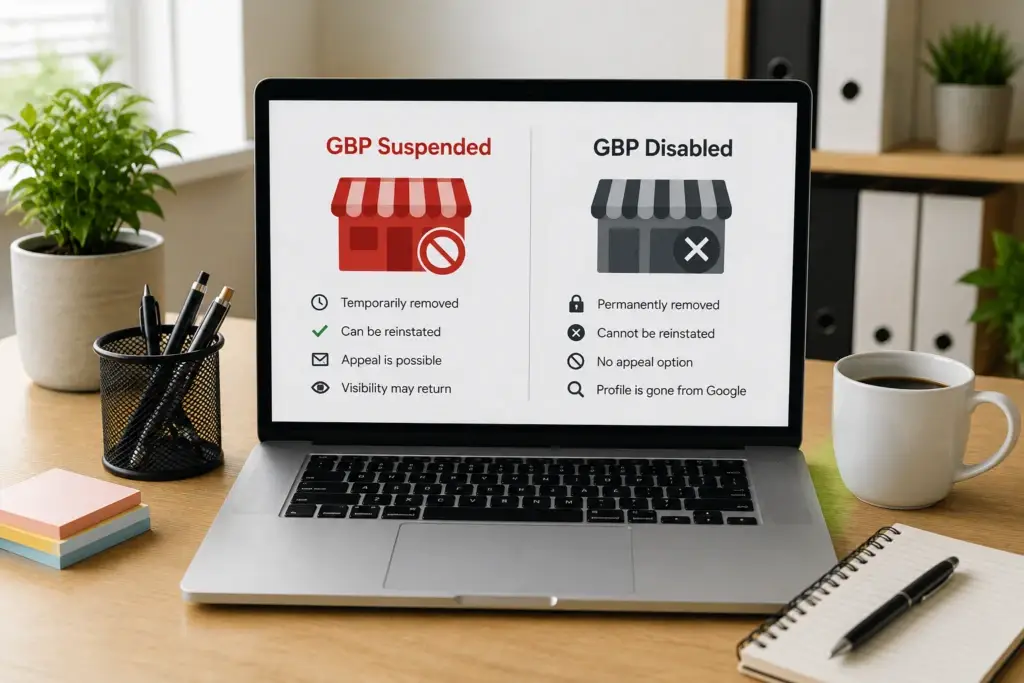
Your GBP suspended notice just appeared — or at least you think it did. You logged into your Google Business Profile and something is wrong. But before you do anything, you need to figure out whether your listing is actually suspended or whether it’s been disabled. Google treats these as two very different situations, and the difference changes everything about how you get it back.
Most business owners search “GBP suspended” as a catch-all term for any listing that’s been taken down. Google doesn’t. They treat suspended and disabled profiles as fundamentally different situations with different causes, different recovery paths, and very different timelines. After resolving over 250 GBP suspensions and disabled listings with a 98% success rate, here’s what you need to know about each one.
What Is a GBP Suspension?
When your GBP suspended status appears, it means Google has removed your listing from public view — Google Maps, local search, the map pack — but your profile still exists in Google’s system. You can still log into your Google Business Profile dashboard and see your listing. Depending on the suspension type, you may still be able to edit it.
Think of a suspension as Google putting your listing on hold. They’ve identified a problem and pulled your profile until the problem is resolved. Your data, your reviews, your photos, your listing history — all of it is still there, waiting to be restored.
Types of Suspensions
Soft suspension: Your listing is in your dashboard and editable, but invisible to the public. Google has flagged a guideline violation they consider correctable. You can fix the issue and submit a reinstatement request directly through the dashboard.
Hard suspension: Your listing shows a suspension notice in the dashboard. Editing may be restricted or locked. Google has identified a more serious violation. Reinstatement requires a formal appeal with supporting documentation.
Both types of GBP suspended status share one critical feature: your listing is recoverable through Google’s reinstatement process. The profile exists. It just needs to be unlocked.
What Is a Disabled GBP?
A disabled Google Business Profile is a different situation entirely. When Google disables a listing, they don’t just hide it — they effectively remove it from their system. Your listing isn’t suspended and waiting for an appeal. It’s been taken down at a deeper level.
A disabled listing may disappear from your dashboard entirely, or you may see a message indicating the profile has been disabled or removed. Unlike a suspension, there’s often no clear reinstatement button or obvious appeal path within the standard GBP interface.
Google disables listings when they’ve determined the violation is severe enough that a standard suspension isn’t sufficient. This is their most aggressive enforcement action short of permanently banning an account.
Key Differences Between Suspended and Disabled Profiles
Understanding whether your GBP suspended status is a suspension or a full disabling isn’t academic — it directly determines your recovery strategy, timeline, and likelihood of success.
Dashboard Access
Suspended: You can still see and usually access your listing in the GBP dashboard. Soft suspensions allow full editing. Hard suspensions may restrict some features but the listing is visible in your account.
Disabled: Your listing may be removed from your dashboard entirely. You might see a disabled notice, or the listing may simply disappear as if it never existed. Dashboard-based reinstatement tools are typically unavailable.
Review and Rating History
Suspended: Your reviews, ratings, photos, and listing history are preserved. When a suspended GBP is reinstated, everything comes back — your star rating, your review count, your photo library, your Q&A section. Nothing is lost during the suspension period.
Disabled: Review preservation is less certain. In many cases, reviews and listing data can be recovered if the listing is successfully restored, but the process is more complex and outcomes vary. Some disabled listings lose historical data permanently.
Reinstatement Path
Suspended: Clear reinstatement process. For soft suspensions, fix the violation and submit through the dashboard. For hard suspensions, submit the formal reinstatement form with documentation. The path is defined even if it’s not easy.
Disabled: No standard reinstatement path. The dashboard reinstatement option is usually unavailable. Recovery requires alternative channels — escalation paths, specialized forms, or approaches that go beyond the standard GBP support infrastructure. This is where most business owners get stuck.
Timeline
Suspended: Soft suspensions resolve in 3-10 business days. Hard suspensions take 2-4 weeks with proper documentation. Timelines are relatively predictable.
Disabled: Timelines are significantly longer and less predictable. Simple disabled cases may resolve in 4-6 weeks. Complex cases — especially those involving account-level flags or associations with other disabled listings — can take 8 weeks or longer.
Severity Signal
Suspended: A GBP suspended notice means Google believes your listing has a fixable problem. They’ve pulled it from view but they’re open to restoring it once the issue is addressed. A suspension is a yellow card.
Disabled: Google has determined that the violation is serious enough to warrant removal from their system. A disabled listing is a red card. Recovery is possible, but Google needs significantly more convincing that your business is legitimate and compliant.
What Causes a Listing to Be Disabled Instead of Suspended?
Google doesn’t publish explicit criteria for when they disable versus suspend a listing. But based on the patterns we see across hundreds of cases, disabled listings typically involve one or more of these factors.
Fraud or Deception Flags
If Google believes your listing was created to deceive users — a fake business at a fake address designed to capture leads — they’re more likely to disable than suspend. This includes listings that appear to be part of a lead generation network, listings with fabricated business information, or listings that misrepresent what the business actually does.
Repeated Violations
A first-time name policy violation usually results in a GBP suspended notice rather than a full disabling. A business that has been suspended and reinstated multiple times for the same or similar violations may get disabled on the next offense. Google’s patience has limits.
Account-Level Issues
When the problem goes beyond a single listing to the Google account itself — compromised accounts, accounts associated with spam networks, accounts that manage multiple suspended listings — Google may disable individual listings as part of a broader account action.
Association with Flagged Entities
If your listing was previously managed by an SEO agency or marketing company that Google has flagged for guideline violations across multiple clients, your listing may inherit that risk. Similarly, if your business address was previously used by a disabled listing under a different business name, Google applies extra scrutiny.
Industry-Specific Enforcement
Certain industries face heavier enforcement — legal services, locksmiths, garage door repair, home services, and other sectors where Google has identified high rates of fake or misleading listings. Businesses in these industries may see disabled actions where businesses in lower-risk industries would receive a suspension for the same violation.
How to Tell Which One You’re Dealing With
If you searched “GBP suspended” but aren’t sure whether your listing is suspended or disabled, here’s how to figure it out.
Check your GBP dashboard. Log into business.google.com and look for your listing.
- If you can see your listing with a suspension notice but it’s still in your account → suspended
- If you can see your listing and edit it but it’s not appearing in search → soft suspension
- If your listing has disappeared from your dashboard entirely → likely disabled
- If you see a message saying your profile has been removed or disabled → disabled
Check Google Maps directly. Search for your business name and address on Google Maps.
- If your business doesn’t appear at all → could be either, check your dashboard
- If a listing appears but shows limited information or can’t be claimed → may indicate a disabled listing that’s left a ghost footprint
Check your email. Google sometimes sends notifications about listing actions to the email associated with your GBP account. Check your inbox and spam folder for messages from Google about your Business Profile.
Recovery Strategy: Suspended Listings
If your GBP suspended status is a standard suspension, the recovery process is well-defined.
- Identify the violation — Audit your listing against Google’s current guidelines to determine what triggered the suspension
- Fix every issue — Correct all violations, not just the one you think is the primary cause
- Assemble documentation — Business registration, utility bills, location photos, and any other proof that your business is legitimate and operates at the listed address
- Submit reinstatement — Through the dashboard for soft suspensions, through the formal reinstatement form for hard suspensions
- Wait for review — 3-10 days for soft, 2-4 weeks for hard suspensions
If your first appeal is denied, you can resubmit with stronger documentation and a more specific narrative. The path remains open.
Recovery Strategy: Disabled Listings
Disabled listing recovery requires a fundamentally different approach.
Standard reinstatement tools don’t work. The dashboard button, the reinstatement form — these channels are designed for suspended listings and typically don’t apply to disabled ones. Submitting through these channels wastes time and may not even reach the right review team.
Documentation requirements are higher. Google needs more convincing for a disabled listing than a suspended one. Every piece of evidence that your business is real, operates at the listed address, and meets Google’s guidelines needs to be airtight. Gaps that might be overlooked in a suspension appeal will sink a disabled listing recovery.
Escalation paths matter. Recovering a disabled listing often requires reaching Google’s support infrastructure through channels that aren’t publicly advertised. The specific path depends on the nature of the disabling action, the account history, and the type of business involved.
Account-level issues must be resolved first. If the disabling action is connected to broader account problems — other disabled listings, account security flags, association with penalized management accounts — the individual listing can’t be recovered until the account-level issues are addressed.
This is the category of GBP problem where a specialist adds the most value. The recovery paths for disabled listings aren’t documented in Google’s help center. They require experience navigating Google’s support infrastructure and knowing which approaches are currently effective for different types of disabled listings.
Don’t Make a Bad Situation Worse
Whether your GBP suspended situation is a suspension or a disabled listing, the same critical mistakes apply.
Do not create a new listing. A new listing at the same address, with the same phone number, or from the same account will be flagged as a duplicate — and potentially disabled immediately. This makes recovering your original listing harder.
Do not file rapid-fire appeals. Each submission resets the review queue. Multiple incomplete appeals look worse than one well-prepared submission.
Do not delete the listing. Deleting a suspended listing means losing your reviews and listing history permanently. Even for disabled listings, deletion is almost never the right move.
If your Google Business Profile has been suspended or disabled, contact us for a free assessment. We’ll determine exactly which situation you’re in and map out the fastest path to getting your listing restored.
Frequently Asked Questions
Can a suspended Google Business Profile become disabled?
Yes. If a GBP suspended listing goes unaddressed for an extended period, or if the business owner submits multiple failed reinstatement attempts without resolving the underlying violation, Google may escalate from suspension to disabling the listing. Additionally, if Google identifies additional violations during the reinstatement review process, they may disable the listing instead of continuing the suspension. Addressing suspensions promptly reduces the risk of escalation.
Do I lose my Google reviews if my listing is disabled?
Not necessarily, but it depends on the recovery outcome. When a disabled listing is successfully restored through the right channels, reviews and listing history can often be recovered. However, the longer a listing stays disabled and the more complex the case, the less certain data recovery becomes. This is a key reason to pursue recovery quickly rather than waiting months to address a disabled listing.
Is it easier to just start over with a new Google Business Profile?
No. Creating a new listing while your original is suspended or disabled almost always triggers immediate enforcement action on the new listing — typically a duplicate suspension or disabling. Google connects listings by address, phone number, website, and account ownership. A new listing doesn’t give you a clean slate; it creates a second problem on top of the first. Working through reinstatement or recovery on your existing listing is nearly always the correct approach.
How do I know if my listing was disabled because of my SEO agency?
Signs include: the suspension or disabling happened shortly after an agency made changes to your listing, your listing was managed through the agency’s Google account rather than your own, or the agency managed multiple businesses that have also been suspended or disabled. Google tracks management relationships across listings. If your agency’s account or practices triggered flags on other clients, that risk extends to every listing they manage. A full listing and account audit can identify these association flags.
Can a disabled Google Business Profile be permanently unrecoverable?
In rare cases, yes. Listings associated with confirmed fraud, systematic deception, or severe terms of service violations may not be recoverable. However, for the vast majority of legitimate businesses, even disabled listings can be restored with the right approach and documentation. The distinction is almost always between businesses engaged in actual deception and businesses that unknowingly violated guidelines or were affected by association flags they weren’t aware of.