Published: October 10, 2026 | Reviewed by GBP Suspensions
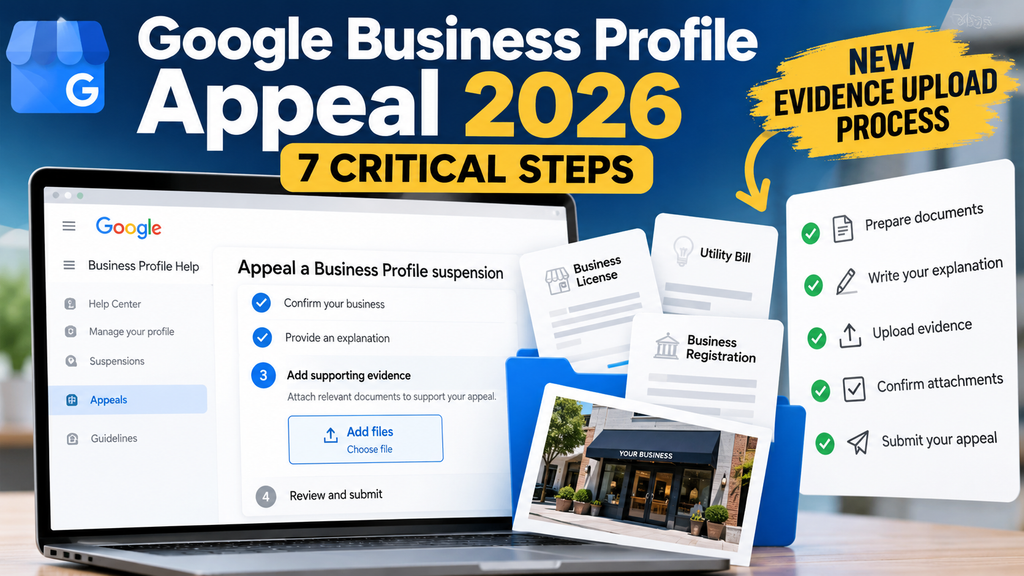
Google Business Profile Appeal 2026 procedures include an important change: businesses can now upload supporting evidence directly inside Google’s appeals tool before submitting their appeal.
Previously, business owners submitted their appeal and then used a separate evidence form with a 60-minute deadline. The updated workflow allows businesses to attach multiple supporting documents, write an explanation, and confirm their evidence before final submission.
Quick Answer: If your Google Business Profile is suspended or disabled, prepare your business documents and written explanation before submitting your appeal. Google’s updated process allows supporting evidence to be uploaded inside the appeals tool. Confirm your files are attached before clicking the final submission button.
This guide explains the new workflow, seven critical steps, which documents can support reinstatement, and how businesses and agencies should prepare their appeals.
Google Business Profile Appeal 2026: What Changed?
The biggest change to the appeal process is when and where supporting evidence is submitted.
Under the previous workflow, businesses submitted an appeal before uploading their supporting documentation through a separate form.
Google’s updated instructions now describe an integrated submission process.
| Previous appeal process | Updated 2026 appeal process |
|---|---|
| Submit appeal before evidence | Attach evidence before final submission |
| Separate evidence form | Evidence uploaded inside the appeals tool |
| 60-minute evidence deadline | No separate 60-minute step in current English instructions |
| Separate attachment fields | Multiple supporting files supported |
| Evidence added after submission | Evidence confirmed before submission |
Google’s revised appeals workflow was publicly reported in July 2026. GBP Suspensions verified the current English-language instructions on October 10, 2026.
Google has not announced an exact effective date on the official help pages reviewed.
Important: This is a change to the appeal submission workflow. It does not establish a change to Google’s underlying Business Profile eligibility or suspension policies.
You can review the current requirements in Google’s official Business Profile appeals guidance.
How to Complete a Google Business Profile Appeal in 2026: 7 Critical Steps
Submitting a successful appeal requires more than uploading a business license.
The goal is to demonstrate that the business is legitimate, eligible, accurately represented, and compliant with Google’s policies.
Follow these seven steps before submitting.
Step 1: Confirm Your Google Business Profile Is Actually Suspended
Before starting an appeal, determine whether your Business Profile is suspended, disabled, unverified, or simply not appearing in search results.
These situations require different solutions.
A Business Profile that does not appear for competitive keywords is not necessarily suspended.
Likewise, a business that was recently reinstated but is not yet appearing normally may require a different investigation.
Check the Business Profile dashboard and any notification Google sent about the restriction.
If you’re unsure what happened to the listing, start with our Google Business Profile Not Showing: 7 Critical Checks guide.
Do not create a replacement Business Profile simply because your original listing disappeared.
Step 2: Open the Google Business Profile Appeals Tool
Use the appeals tool provided through Google’s official Business Profile help guidance.
Sign in with the Google account associated with the affected business.
Google may ask you to confirm the account or switch to another account.
Select the correct Business Profile and continue.
If you manage multiple businesses, carefully confirm which location you are appealing.
Submitting evidence for the wrong profile can create unnecessary complications.
Step 3: Review the Suspension Decision and Applicable Google Policy
Before writing an appeal, review the information displayed in the appeals tool.
Google may provide:
- The date of the moderation decision.
- The reason for the restriction.
- A link to the relevant policy.
- Whether the decision is eligible for appeal.
- The current status of the decision.
Do not automatically assume you know what caused the suspension.
A recent business name change, address edit, duplicate listing, verification problem, or sudden increase in reviews may deserve investigation, but none of those facts alone confirms the reason for suspension.
Instead, compare Google’s moderation notice with the actual business operations, profile information, policies, and supporting documentation.
Possible compliance concerns worth reviewing include:
- Business name accuracy.
- Primary business category.
- Eligibility of the operating location.
- Address visibility.
- Service-area configuration.
- Duplicate Business Profiles.
- Accurate business contact information.
- Whether the business operates as represented.
Only identify a likely cause when the evidence supports that conclusion.
Step 4: Prepare Supporting Evidence Before Submitting
The Google Business Profile Appeal 2026 process makes evidence preparation particularly important because supporting documents can be attached before final submission.
Google identifies several examples of evidence that may strengthen an eligible appeal.
Official business documentation
- Business registration.
- Business license.
- Tax certificates.
- Business utility bills.
Examples of relevant utility bills include electricity, phone, water, cable, and internet service, depending on the documentation and applicable guidance.
Google advises that the business name and address on supporting documents should match the information associated with the Business Profile.
If a business operates under a registered trade name or DBA, documentation connecting the legal entity to the trade name may help explain that relationship.
A difference between a legal name and a trade name does not automatically establish a policy violation.
Additional supporting evidence
Depending on the case, supplemental evidence may include:
- Lease or occupancy documentation.
- Business insurance documentation.
- Permanent storefront signage.
- Interior or exterior business photographs.
- Branded service vehicles.
- Professional equipment.
- Other documents establishing actual business operations.
These are examples of possible case-specific evidence, not a universal list of Google-required documents.
The most useful evidence is documentation that directly addresses the issue being evaluated.
Step 5: Write a Clear, Case-Specific Appeal Explanation
Google’s revised workflow includes a text field where businesses can explain why their profile should be reinstated.
A strong explanation should establish the basic facts without making unsupported claims.
Explain:
- The real-world business name.
- The services or products offered.
- Where and how the business operates.
- Whether customers visit the business or the business travels to customers.
- Why the business qualifies for a Google Business Profile.
- How the supporting documents establish those facts.
- Any confirmed compliance issue that has been corrected.
For example, a legitimate home-based plumbing company may need to explain that it operates as a service-area business and visits customers at their locations.
A storefront business may instead need to establish that it genuinely serves customers at its listed address.
These two businesses should not use identical appeal explanations or document packages.
Avoid generic statements such as “Our business is legitimate, so please remove the suspension” without providing the relevant supporting information.
Step 6: Upload Multiple Evidence Files Inside the Appeals Tool
One of the most important Google Business Profile Appeal 2026 updates is the ability to attach multiple supporting documents directly within the appeal workflow.
Google’s instructions describe selecting Add → Choose file to upload supporting evidence.
Before moving forward, verify that:
- The correct files have been selected.
- Each document is readable.
- Business names and addresses have been reviewed.
- The documents relate to the correct Business Profile.
- The written explanation is consistent with the evidence.
- No important supporting document has been overlooked.
Do not assume that uploading more files automatically creates a stronger case.
A smaller collection of relevant, accurate documents may be more useful than a large collection of unrelated materials.
Step 7: Confirm Your Evidence and Submit the Appeal Once
After attaching your supporting documents and writing the explanation, review the entire submission.
Google’s updated workflow includes a confirmation checkbox stating that the appeal is ready and that all optional supporting evidence has been attached.
Complete that confirmation before selecting Submit appeal.
Google warns that an initial appeal can only be submitted once through the workflow.
This makes a final evidence review especially important.
After submitting, Google will review the appeal and send its decision by email.
Google states that appeal reviews and decisions can take up to five business days.
Do not submit multiple appeals for the same issue while waiting for a decision.
What Evidence Is Best for a Google Business Profile Suspension Appeal?
Evidence requirements and useful supporting materials depend on the business model and the issues involved.
Storefront Businesses
A storefront should accurately represent a real location where customers can receive services during the stated business hours.
Relevant evidence may include registration documents, licenses, utility bills, occupancy documentation, and photographs establishing genuine operations.
Service-Area Businesses
A service-area business may operate from a legitimate home or business location without publicly displaying that address.
Businesses that travel to customers and do not serve customers at their operating address generally should hide the address on their public Business Profile.
A hidden address is not automatically a violation.
The business should still have legitimate operations and documentation supporting the location associated with the profile.
Businesses With DBA or Trade Names
Some businesses operate under a trade name that differs from the registered legal entity.
In those circumstances, documentation connecting the two names may help establish the business’s identity.
Do not assume every naming difference is the cause of a suspension.
Businesses With Duplicate Listings
A duplicate Business Profile may deserve investigation, but a suspected duplicate should not automatically be deleted.
Determine whether the listings represent the same business, separate eligible locations, or an ownership issue before taking corrective action.
Google Business Profile Appeal 2026: Bulk Reinstatement for Multiple Locations
The updated workflow also addresses bulk reinstatement requests involving 10 or more suspended locations.
When the bulk reinstatement option is available, Google asks whether the request involves multiple suspended locations.
The process includes:
- Selecting the relevant Business Profile.
- Choosing the bulk reinstatement option when applicable.
- Preparing a spreadsheet containing the Business Profile IDs of the affected locations.
- Uploading the spreadsheet and relevant supporting documents.
- Confirming the attachments before submitting.
Google notes that the appeals tool may update the appeal status only for the selected Business Profile.
The appeal decision email may also refer only to that selected profile.
For agencies and multi-location businesses, preparing an accurate spreadsheet and organized evidence package before submission helps avoid unnecessary errors.
What Does Google’s Official Appeal Policy Require?
Google’s Business Profile guidelines determine whether a business is eligible to maintain a profile.
The updated appeal workflow does not remove those eligibility requirements.
A business can have valid registration documents and still maintain a noncompliant Business Profile.
For example, issues may involve an ineligible location, inaccurate business name, inappropriate address visibility, or misleading business representation.
A strong appeal therefore needs to establish two things:
Business legitimacy: The company genuinely exists and conducts the operations it describes.
Business Profile eligibility: The business and its listing comply with the applicable Google requirements.
Supporting documents may establish business legitimacy, but the full profile must still satisfy Google’s rules.
Google Business Profile Appeal 2026 Checklist
Before submitting your appeal, review this checklist.
- Confirm the correct Google account.
- Identify the correct suspended Business Profile.
- Read Google’s stated moderation reason.
- Compare the relevant policy against the available facts.
- Confirm Business Profile eligibility.
- Address any verified compliance issue.
- Prepare the written explanation.
- Gather relevant supporting documentation.
- Review business names and addresses for consistency.
- Upload the appropriate evidence files.
- Include the profile-ID spreadsheet if using bulk reinstatement.
- Confirm all attachments before final submission.
- Save a record of the appeal and track the decision.
A complete checklist does not guarantee reinstatement, but it can reduce the risk of avoidable submission mistakes.
What Happens If Your Google Business Profile Appeal Is Denied?
Google may return a decision marked Not Approved.
That means the initial reinstatement request was denied.
It does not necessarily establish exactly which document, profile detail, or compliance issue caused the denial.
Google may provide an additional-review process for a denied reinstatement request.
That process can allow a business to provide evidence that was not included in the original appeal.
However, an additional review should not be treated as an opportunity to repeatedly submit the same generic explanation.
Review the denial, original evidence, Business Profile eligibility, and any new information before proceeding.
If your reinstatement request has already been rejected, see our GBP Appeal Denied assistance.
Frequently Asked Questions About Google Business Profile Appeals
What changed in the Google Business Profile Appeal 2026 process?
Google updated its appeal workflow to allow supporting evidence and a written explanation to be added inside the appeals tool before final submission. Businesses can attach multiple files rather than relying on the former separate evidence-upload process.
Does Google still have a 60-minute evidence deadline?
Google’s current English-language appeals guidance no longer describes the previous separate 60-minute evidence deadline. Instead, it describes attaching evidence before submitting the appeal. Some older or localized help instructions may still describe the previous process, so follow the instructions displayed in your live appeals tool.
Can I upload multiple documents with a Google Business Profile appeal?
Yes. Google’s updated instructions state that multiple supporting files can be attached to an eligible appeal.
Is supporting evidence required for reinstatement?
Google identifies supporting evidence as optional. However, relevant documents can help substantiate the business’s eligibility and strengthen the appeal.
Can I upload evidence after submitting my appeal?
Do not rely on a separate post-submission upload window under the updated workflow. Prepare and attach the evidence before final submission. If the initial reinstatement request is denied, Google may provide an additional-review process where new evidence can be supplied.
Can I submit a second Google Business Profile appeal?
Google warns that the initial appeal can be submitted only once. A separate additional review may be available after a denied reinstatement request, depending on the case and Google’s available options.
How long does Google take to review an appeal?
Google states that appeal reviews and decisions can take up to five business days. Actual case circumstances may require further follow-up.
Can a service-area business appeal without displaying its address?
Yes. An eligible service-area business that does not receive customers at its operating location generally should hide its address from the public. It must still accurately represent its operations and comply with Google’s eligibility rules.
Does this change apply to agencies with multiple locations?
Google’s revised guidance includes a bulk reinstatement workflow for eligible multi-location cases. The process calls for a spreadsheet containing suspended Business Profile IDs and relevant supporting documentation before submission.
Does the new process guarantee Google Business Profile reinstatement?
No. Google controls reinstatement decisions. A complete appeal supported by accurate evidence does not guarantee approval.
Get Help With Your Google Business Profile Appeal
The Google Business Profile Appeal 2026 workflow makes uploading supporting evidence more straightforward, but preparing a compliant reinstatement appeal still requires careful evaluation.
At GBP Suspensions, we specialize in:
- Google Business Profile suspension evaluations.
- Reinstatement appeals.
- Denied appeal reviews.
- Business verification problems.
- Service-area business compliance.
- Duplicate listing issues.
- Agency and multi-location reinstatement support.
We review the available facts, identify supported compliance concerns, and help prepare evidence and appeal explanations appropriate to the specific business.
If your Business Profile has been suspended or disabled, getting the case evaluated before submitting can help you avoid unnecessary mistakes.
Request Your Free Google Business Profile Suspension Case Review
GBP Suspensions is an independent Google Business Profile reinstatement service. We are not affiliated with, endorsed by, or sponsored by Google. Google makes all reinstatement decisions. Results are not guaranteed.
Last policy verification: October 10, 2026.