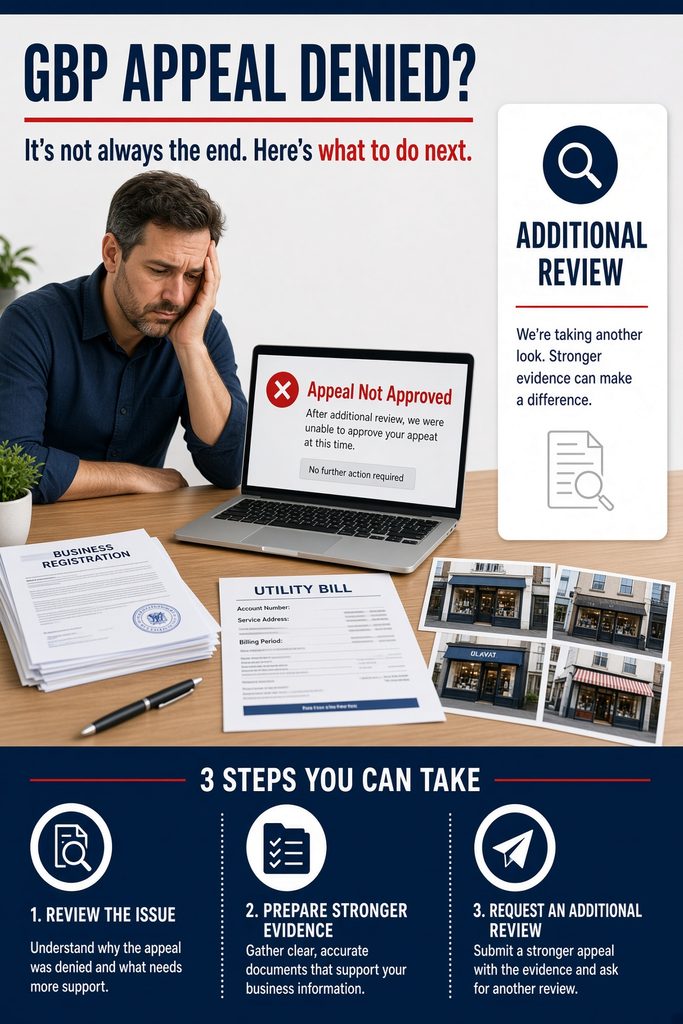
If your Google Business Profile appeal was denied, the process may not be over.
Google currently states that when a reinstatement request is denied, a business may be eligible for an additional review. That review can give you another opportunity to establish that the business is eligible for a Google Business Profile and complies with Google’s guidelines.
The mistake is treating an additional review like a second chance to submit the exact same appeal.
It isn’t.
Before requesting another review, determine what the first submission may have failed to establish, review the profile against Google’s current requirements, and prepare evidence that directly supports how the business actually operates.
What Is a Google Business Profile Additional Review?
A Google Business Profile additional review is a review Google may make available after an original reinstatement request has been denied.
Google’s current suspension guidance states that businesses can provide additional evidence that was not included with the original appeal.
This is important.
The goal is not simply to send Google more files.
The goal is to present a stronger, clearer body of evidence showing that:
- The business is legitimate.
- The business is eligible for a Google Business Profile.
- The profile accurately represents the real-world business.
- The business operates where and how the profile says it operates.
- Any confirmed policy problems have been corrected.
If you are still trying to understand the original suspension rather than a denied appeal, start with our Google Business Profile suspension guide.
What Does “Not Approved” Mean in the GBP Appeals Tool?
Google’s Business Profile appeals tool can currently show statuses including:
- Submitted
- Approved
- Not Approved
- Can’t be appealed
- Eligible for appeal
If the reinstatement appeal shows Not Approved, Google rejected that request.
That does not automatically tell you exactly why your evidence was insufficient or whether one specific profile field caused the denial.
This is why you should not immediately start changing your business name, address, category, phone number, website, or service area based on a guess.
Diagnose first.
Then correct only what the available evidence supports.
Can You Appeal a Google Business Profile Suspension Twice?
Google may allow an additional review after a denied reinstatement request.
People often call this:
- A second GBP appeal
- Second review
- Re-appeal
- Manual review
- Additional appeal
Google’s own terminology is additional review.
The distinction matters because the objective should not be to repeat the original appeal.
A better question is:
What does Google still need to see to establish that this business and profile are eligible and compliant?
Before Requesting an Additional Review, Audit the Original Appeal
This is the step many businesses skip.
Before submitting anything else, compare the original appeal with the Business Profile as it exists today.
Review:
- Business name
- Primary category
- Address
- Address visibility
- Service area
- Website
- Phone number
- Business hours
- Business model
- Duplicate listings
- Supporting documents
- The moderation reason shown by Google
Do not assume a recent edit caused the suspension simply because the timing overlaps.
Do not assume an address difference, coworking location, review increase, or verification request proves the violation either.
Every suspension should be compared against the actual profile, business operation, Google policy, and available evidence.
1. Start With the Moderation Reason Google Shows You
Google’s appeals tool can show the restricted profile, the reason for the moderation action, and a link to the applicable policy.
Start there.
That gives you a better foundation than guessing.
For example, if Google identifies an eligibility or representation issue, review the parts of the profile related to how the business is represented.
If the issue involves the location, evaluate how the business actually operates from that location.
The objective is not to find something to change.
The objective is to determine whether anything is actually noncompliant.
2. Check the Business Name Against the Real-World Business
The Business Profile name should represent the name the business actually uses in the real world.
Do not add unnecessary:
- Cities
- Service keywords
- Marketing language
- Phone numbers
- Taglines
unless they are legitimately part of the real-world business name.
Compare the GBP name with evidence such as:
- Business registration
- Business license
- Website
- Permanent signage when applicable
- Invoices
- Other real-world branding
For example:
Smith Plumbing
should not simply become:
Smith Plumbing – Best Emergency Plumber Philadelphia
to rank for more searches if that expanded wording is not actually the business name.
3. Review the Address and Business Model
Location issues require more than checking whether an address exists.
First identify the actual business model.
Storefront
Customers visit the business location during its stated hours.
Service-Area Business
The business travels to customers rather than serving them at the business address.
Hybrid Business
Customers can visit the staffed location and the business also travels to customers.
A home-based service-area business is not automatically ineligible.
A coworking location is not automatically prohibited simply because it is coworking.
The real question is whether the location and profile setup meet Google’s eligibility and representation requirements for how that particular business operates.
If customers are not served at a service-area business’s address, the address generally should not be publicly displayed.
4. Compare Your Evidence With the Business Profile
Google currently identifies several examples of evidence that may strengthen an appeal:
- Official business registration
- Business license
- Tax certificates
- Business utility bills
- Electricity bill
- Phone bill
- Water bill
- Internet bill
Google also advises that the business name and address on submitted evidence should match the Business Profile being appealed.
Before submitting your additional review, literally place the information side by side.
Google Business Profile
Business name:
Address:
Phone:
Website:
Business Evidence
Registration name:
License address:
Utility address:
Website business name:
Other supporting information:
You are looking for inconsistencies before Google finds them.
An inconsistency does not automatically prove why the first appeal failed, but it should be understood before another submission is made.
5. Add Evidence That Was Missing From the First Appeal
Google specifically states that an additional review can include evidence that was not included with the original appeal.
This can be one of the strongest opportunities in the process.
Depending on the business, relevant evidence might include:
- Business registration
- Business license
- Tax documentation
- Utility bill
- Lease or occupancy documentation
- Insurance documentation
- Permanent signage
- Exterior business photos
- Interior workspace photos
- Branded vehicles
- Professional equipment
- Documents connecting the business to the location
Not every business should submit the exact same evidence.
A plumber operating from a home as a service-area business has a different evidence profile than a restaurant serving customers at a commercial storefront.
Build the evidence around the actual business.
6. Prepare Your Evidence Before Opening Google’s Form
This is important.
Google currently states that after you open the evidence form, supporting evidence must be submitted within 60 minutes or it will not be attached to the appeal.
Do not start looking for documents after opening it.
Have your evidence prepared first.
Create a folder containing:
- Business registration
- License, if applicable
- Utility documentation
- Location evidence
- Business operation evidence
- Relevant photographs
- Any new evidence not included with the first appeal
Use clear file names.
For example:
Smith-Plumbing-Business-Registration.pdf
is much easier to understand than:
IMG_84729.pdf
7. Explain What Each Piece of Evidence Proves
Do not assume that uploading a stack of documents automatically tells the story.
Your additional-review explanation should make the business easy to understand.
State:
- What the business does.
- How customers interact with it.
- Where it operates.
- Whether it is storefront, service-area, or hybrid.
- Why it qualifies for a Business Profile.
- What evidence supports those facts.
- What was corrected, if a confirmed issue required correction.
Keep it factual.
This isn’t the place for a long explanation of how badly the suspension has affected revenue.
Google’s decision is primarily about eligibility, representation, compliance, and evidence.
What If Your Appeal Was Denied After You Submitted Documents?
Submitting legitimate documents does not guarantee reinstatement.
Google evaluates more than whether a business license exists.
The Business Profile itself still needs to comply with Google’s requirements.
For example, a legitimate registered company could still have a profile issue involving:
- An ineligible location
- Incorrect address visibility
- A misleading business name
- Duplicate profiles
- An incorrect business model
- Other representation or eligibility problems
That is why an additional review should consider the entire case, not simply the number of documents submitted.
For a deeper breakdown of how we approach denied cases, see our GBP appeal denied review.
What If the Additional Review Option Is Missing?
Some businesses reach another frustrating situation:
The appeal is denied, but the additional-review option does not appear or the appeals process cannot be completed.
Before assuming you need another profile:
- Confirm that you are signed into the correct Google account.
- Check the exact status in the appeals tool.
- Review any Google emails associated with the case.
- Save your original case number.
- Save screenshots of the appeal status.
- Gather your evidence before contacting support.
Do not create a replacement Google Business Profile simply to bypass the suspended one.
Google specifically warns businesses not to create a new Business Profile for the same business while an appeal is under review.
Creating duplicates can make an already complicated case harder to resolve.
What If Google Is Asking for Verification Instead?
A verification problem and a suspension appeal are not the same thing.
You may encounter situations where Google asks for verification or re-verification during the process.
If Google is showing No More Ways to Verify, read our complete guide:
No More Ways to Verify Google Business Profile: What to Do After Video Verification Fails
That is also different from a profile that has been suspended and shows an appeal decision.
Always work from the exact status Google is showing.
Google Business Profile Additional Review vs. Verification
| Status | What It Means | Primary Next Step |
|---|---|---|
| Verification required | Google has not confirmed the business/profile | Complete an offered verification method |
| Review issues | A submitted verification did not satisfy Google’s requirements | Review Google’s stated issues |
| Suspended or disabled | Google restricted the Business Profile | Review compliance and appeal |
| Appeal submitted | Google is reviewing the reinstatement request | Wait for the decision |
| Appeal approved | Google approved the reinstatement request | Monitor the profile |
| Appeal not approved | The reinstatement request was denied | Determine whether additional review is available |
| Additional review | Google is reviewing a denied reinstatement request again | Submit stronger or new supporting evidence |
Should You Create a New GBP After an Appeal Is Denied?
Generally, no.
Creating another Business Profile for the same business does not fix the underlying issue.
It can also create:
- Duplicate profiles
- Ownership conflicts
- Additional verification problems
- Another suspended listing
Resolve the existing case correctly instead.
If you’re unsure whether the profile is suspended, missing, duplicated, or simply not ranking, use our Google Business Profile Not Showing: 7 Critical Checks guide before taking further action.
Common Mistakes Before a Google Business Profile Additional Review
Avoid these:
Resubmitting the Same Case
If nothing has changed and no additional evidence has been added, you may simply recreate the weakness of the first appeal.
Making Random Profile Changes
Do not change the name, category, address, website and phone number just because the appeal failed.
Identify a supported reason first.
Assuming the Suspension Cause
Timing is not proof.
A recent profile edit may have occurred before a suspension without being the confirmed cause.
Creating Another GBP
Do not use another listing as a shortcut around the suspension.
Uploading Irrelevant Documents
More documents are not necessarily stronger evidence.
Submit evidence that establishes eligibility, location, business operation, and accurate representation.
Waiting Until the Evidence Form Opens to Gather Documents
Google’s 60-minute evidence window makes preparation important.
Have everything ready beforehand.
How Strong Is Your Additional Review Case?
Before submitting, you should be able to answer yes to these questions:
- Is the business eligible for a Google Business Profile?
- Does the profile accurately represent the real business?
- Does the business name match the real-world name?
- Is the location configuration correct?
- Is the address displayed or hidden appropriately?
- Are there unresolved duplicate listings?
- Do the documents support the information on the profile?
- Does the business name match across the strongest evidence?
- Does the address match where applicable?
- Have confirmed compliance issues been corrected?
- Do you have evidence that was missing or unclear in the original appeal?
- Can you clearly explain how the business operates?
If several answers are uncertain, resolve those questions before submitting another review.
Frequently Asked Questions
What is a Google Business Profile additional review?
An additional review is a review Google may offer after a Business Profile reinstatement request is denied. Google states that businesses can provide additional evidence that was not submitted with the original appeal.
Can I appeal a Google Business Profile suspension twice?
If the initial reinstatement request is denied, Google may make an additional review available. Whether it is available depends on the case and the options shown by Google.
What evidence should I submit for a GBP additional review?
Google currently lists official business registration, business licenses, tax certificates, and qualifying business utility bills as examples of evidence that may strengthen an appeal. Other evidence should be relevant to establishing the specific business’s eligibility and operation.
Does my evidence need to match my Google Business Profile?
Google specifically advises businesses to check that the business name and address on submitted documents match the Business Profile being appealed.
How long do I have to upload GBP appeal evidence?
Google currently states that once the evidence form is opened, evidence must be submitted within 60 minutes or it will not be attached to the appeal.
Why was my Google Business Profile appeal denied?
A denied appeal alone does not establish one exact cause. Review Google’s moderation reason, the Business Profile, business eligibility, profile configuration and submitted evidence before drawing a conclusion.
Should I create another Google Business Profile if my appeal was denied?
Do not create another profile simply to bypass an existing suspension. Resolve the original Business Profile case instead.
Can an additional review guarantee reinstatement?
No. Google controls reinstatement decisions. An additional review gives the business another opportunity to present a compliant profile and supporting evidence, but reinstatement is not guaranteed.
Before You Submit the Additional Review
A denied Google Business Profile appeal should trigger a case review — not a rushed resubmission.
Review the profile.
Check the policy Google identified.
Compare the Business Profile against how the business actually operates.
Organize evidence that directly supports the business.
Correct confirmed compliance problems.
Then use the additional review to present a clearer and stronger case.
If your appeal was denied and you want the profile and evidence reviewed before using another opportunity, GBP Suspensions provides Google Business Profile reinstatement services focused specifically on suspension diagnosis, documentation, appeals, additional reviews, and reinstatement.
Last reviewed and updated September 20, 2026 by GBP Suspensions.If your Google Business Profile appeal was denied, the process may not be over.
Google currently states that when a reinstatement request is denied, a business may be eligible for an additional review. That review can give you another opportunity to establish that the business is eligible for a Google Business Profile and complies with Google’s guidelines.
The mistake is treating an additional review like a second chance to submit the exact same appeal.
It isn’t.
Before requesting another review, determine what the first submission may have failed to establish, review the profile against Google’s current requirements, and prepare evidence that directly supports how the business actually operates.
What Is a Google Business Profile Additional Review?
A Google Business Profile additional review is a review Google may make available after an original reinstatement request has been denied.
Google’s current suspension guidance states that businesses can provide additional evidence that was not included with the original appeal.
This is important.
The goal is not simply to send Google more files.
The goal is to present a stronger, clearer body of evidence showing that:
- The business is legitimate.
- The business is eligible for a Google Business Profile.
- The profile accurately represents the real-world business.
- The business operates where and how the profile says it operates.
- Any confirmed policy problems have been corrected.
If you are still trying to understand the original suspension rather than a denied appeal, start with our Google Business Profile suspension guide.
What Does “Not Approved” Mean in the GBP Appeals Tool?
Google’s Business Profile appeals tool can currently show statuses including:
- Submitted
- Approved
- Not Approved
- Can’t be appealed
- Eligible for appeal
If the reinstatement appeal shows Not Approved, Google rejected that request.
That does not automatically tell you exactly why your evidence was insufficient or whether one specific profile field caused the denial.
This is why you should not immediately start changing your business name, address, category, phone number, website, or service area based on a guess.
Diagnose first.
Then correct only what the available evidence supports.
Can You Appeal a Google Business Profile Suspension Twice?
Google may allow an additional review after a denied reinstatement request.
People often call this:
- A second GBP appeal
- Second review
- Re-appeal
- Manual review
- Additional appeal
Google’s own terminology is additional review.
The distinction matters because the objective should not be to repeat the original appeal.
A better question is:
What does Google still need to see to establish that this business and profile are eligible and compliant?
Before Requesting an Additional Review, Audit the Original Appeal
This is the step many businesses skip.
Before submitting anything else, compare the original appeal with the Business Profile as it exists today.
Review:
- Business name
- Primary category
- Address
- Address visibility
- Service area
- Website
- Phone number
- Business hours
- Business model
- Duplicate listings
- Supporting documents
- The moderation reason shown by Google
Do not assume a recent edit caused the suspension simply because the timing overlaps.
Do not assume an address difference, coworking location, review increase, or verification request proves the violation either.
Every suspension should be compared against the actual profile, business operation, Google policy, and available evidence.
1. Start With the Moderation Reason Google Shows You
Google’s appeals tool can show the restricted profile, the reason for the moderation action, and a link to the applicable policy.
Start there.
That gives you a better foundation than guessing.
For example, if Google identifies an eligibility or representation issue, review the parts of the profile related to how the business is represented.
If the issue involves the location, evaluate how the business actually operates from that location.
The objective is not to find something to change.
The objective is to determine whether anything is actually noncompliant.
2. Check the Business Name Against the Real-World Business
The Business Profile name should represent the name the business actually uses in the real world.
Do not add unnecessary:
- Cities
- Service keywords
- Marketing language
- Phone numbers
- Taglines
unless they are legitimately part of the real-world business name.
Compare the GBP name with evidence such as:
- Business registration
- Business license
- Website
- Permanent signage when applicable
- Invoices
- Other real-world branding
For example:
Smith Plumbing
should not simply become:
Smith Plumbing – Best Emergency Plumber Philadelphia
to rank for more searches if that expanded wording is not actually the business name.
3. Review the Address and Business Model
Location issues require more than checking whether an address exists.
First identify the actual business model.
Storefront
Customers visit the business location during its stated hours.
Service-Area Business
The business travels to customers rather than serving them at the business address.
Hybrid Business
Customers can visit the staffed location and the business also travels to customers.
A home-based service-area business is not automatically ineligible.
A coworking location is not automatically prohibited simply because it is coworking.
The real question is whether the location and profile setup meet Google’s eligibility and representation requirements for how that particular business operates.
If customers are not served at a service-area business’s address, the address generally should not be publicly displayed.
4. Compare Your Evidence With the Business Profile
Google currently identifies several examples of evidence that may strengthen an appeal:
- Official business registration
- Business license
- Tax certificates
- Business utility bills
- Electricity bill
- Phone bill
- Water bill
- Internet bill
Google also advises that the business name and address on submitted evidence should match the Business Profile being appealed.
Before submitting your additional review, literally place the information side by side.
Google Business Profile
Business name:
Address:
Phone:
Website:
Business Evidence
Registration name:
License address:
Utility address:
Website business name:
Other supporting information:
You are looking for inconsistencies before Google finds them.
An inconsistency does not automatically prove why the first appeal failed, but it should be understood before another submission is made.
5. Add Evidence That Was Missing From the First Appeal
Google specifically states that an additional review can include evidence that was not included with the original appeal.
This can be one of the strongest opportunities in the process.
Depending on the business, relevant evidence might include:
- Business registration
- Business license
- Tax documentation
- Utility bill
- Lease or occupancy documentation
- Insurance documentation
- Permanent signage
- Exterior business photos
- Interior workspace photos
- Branded vehicles
- Professional equipment
- Documents connecting the business to the location
Not every business should submit the exact same evidence.
A plumber operating from a home as a service-area business has a different evidence profile than a restaurant serving customers at a commercial storefront.
Build the evidence around the actual business.
6. Prepare Your Evidence Before Opening Google’s Form
This is important.
Google currently states that after you open the evidence form, supporting evidence must be submitted within 60 minutes or it will not be attached to the appeal.
Do not start looking for documents after opening it.
Have your evidence prepared first.
Create a folder containing:
- Business registration
- License, if applicable
- Utility documentation
- Location evidence
- Business operation evidence
- Relevant photographs
- Any new evidence not included with the first appeal
Use clear file names.
For example:
Smith-Plumbing-Business-Registration.pdf
is much easier to understand than:
IMG_84729.pdf
7. Explain What Each Piece of Evidence Proves
Do not assume that uploading a stack of documents automatically tells the story.
Your additional-review explanation should make the business easy to understand.
State:
- What the business does.
- How customers interact with it.
- Where it operates.
- Whether it is storefront, service-area, or hybrid.
- Why it qualifies for a Business Profile.
- What evidence supports those facts.
- What was corrected, if a confirmed issue required correction.
Keep it factual.
This isn’t the place for a long explanation of how badly the suspension has affected revenue.
Google’s decision is primarily about eligibility, representation, compliance, and evidence.
What If Your Appeal Was Denied After You Submitted Documents?
Submitting legitimate documents does not guarantee reinstatement.
Google evaluates more than whether a business license exists.
The Business Profile itself still needs to comply with Google’s requirements.
For example, a legitimate registered company could still have a profile issue involving:
- An ineligible location
- Incorrect address visibility
- A misleading business name
- Duplicate profiles
- An incorrect business model
- Other representation or eligibility problems
That is why an additional review should consider the entire case, not simply the number of documents submitted.
For a deeper breakdown of how we approach denied cases, see our GBP appeal denied review.
What If the Additional Review Option Is Missing?
Some businesses reach another frustrating situation:
The appeal is denied, but the additional-review option does not appear or the appeals process cannot be completed.
Before assuming you need another profile:
- Confirm that you are signed into the correct Google account.
- Check the exact status in the appeals tool.
- Review any Google emails associated with the case.
- Save your original case number.
- Save screenshots of the appeal status.
- Gather your evidence before contacting support.
Do not create a replacement Google Business Profile simply to bypass the suspended one.
Google specifically warns businesses not to create a new Business Profile for the same business while an appeal is under review.
Creating duplicates can make an already complicated case harder to resolve.
What If Google Is Asking for Verification Instead?
A verification problem and a suspension appeal are not the same thing.
You may encounter situations where Google asks for verification or re-verification during the process.
If Google is showing No More Ways to Verify, read our complete guide:
No More Ways to Verify Google Business Profile: What to Do After Video Verification Fails
That is also different from a profile that has been suspended and shows an appeal decision.
Always work from the exact status Google is showing.
Google Business Profile Additional Review vs. Verification
| Status | What It Means | Primary Next Step |
|---|---|---|
| Verification required | Google has not confirmed the business/profile | Complete an offered verification method |
| Review issues | A submitted verification did not satisfy Google’s requirements | Review Google’s stated issues |
| Suspended or disabled | Google restricted the Business Profile | Review compliance and appeal |
| Appeal submitted | Google is reviewing the reinstatement request | Wait for the decision |
| Appeal approved | Google approved the reinstatement request | Monitor the profile |
| Appeal not approved | The reinstatement request was denied | Determine whether additional review is available |
| Additional review | Google is reviewing a denied reinstatement request again | Submit stronger or new supporting evidence |
Should You Create a New GBP After an Appeal Is Denied?
Generally, no.
Creating another Business Profile for the same business does not fix the underlying issue.
It can also create:
- Duplicate profiles
- Ownership conflicts
- Additional verification problems
- Another suspended listing
Resolve the existing case correctly instead.
If you’re unsure whether the profile is suspended, missing, duplicated, or simply not ranking, use our Google Business Profile Not Showing: 7 Critical Checks guide before taking further action.
Common Mistakes Before a Google Business Profile Additional Review
Avoid these:
Resubmitting the Same Case
If nothing has changed and no additional evidence has been added, you may simply recreate the weakness of the first appeal.
Making Random Profile Changes
Do not change the name, category, address, website and phone number just because the appeal failed.
Identify a supported reason first.
Assuming the Suspension Cause
Timing is not proof.
A recent profile edit may have occurred before a suspension without being the confirmed cause.
Creating Another GBP
Do not use another listing as a shortcut around the suspension.
Uploading Irrelevant Documents
More documents are not necessarily stronger evidence.
Submit evidence that establishes eligibility, location, business operation, and accurate representation.
Waiting Until the Evidence Form Opens to Gather Documents
Google’s 60-minute evidence window makes preparation important.
Have everything ready beforehand.
How Strong Is Your Additional Review Case?
Before submitting, you should be able to answer yes to these questions:
- Is the business eligible for a Google Business Profile?
- Does the profile accurately represent the real business?
- Does the business name match the real-world name?
- Is the location configuration correct?
- Is the address displayed or hidden appropriately?
- Are there unresolved duplicate listings?
- Do the documents support the information on the profile?
- Does the business name match across the strongest evidence?
- Does the address match where applicable?
- Have confirmed compliance issues been corrected?
- Do you have evidence that was missing or unclear in the original appeal?
- Can you clearly explain how the business operates?
If several answers are uncertain, resolve those questions before submitting another review.
Frequently Asked Questions
What is a Google Business Profile additional review?
An additional review is a review Google may offer after a Business Profile reinstatement request is denied. Google states that businesses can provide additional evidence that was not submitted with the original appeal.
Can I appeal a Google Business Profile suspension twice?
If the initial reinstatement request is denied, Google may make an additional review available. Whether it is available depends on the case and the options shown by Google.
What evidence should I submit for a GBP additional review?
Google currently lists official business registration, business licenses, tax certificates, and qualifying business utility bills as examples of evidence that may strengthen an appeal. Other evidence should be relevant to establishing the specific business’s eligibility and operation.
Does my evidence need to match my Google Business Profile?
Google specifically advises businesses to check that the business name and address on submitted documents match the Business Profile being appealed.
How long do I have to upload GBP appeal evidence?
Google currently states that once the evidence form is opened, evidence must be submitted within 60 minutes or it will not be attached to the appeal.
Why was my Google Business Profile appeal denied?
A denied appeal alone does not establish one exact cause. Review Google’s moderation reason, the Business Profile, business eligibility, profile configuration and submitted evidence before drawing a conclusion.
Should I create another Google Business Profile if my appeal was denied?
Do not create another profile simply to bypass an existing suspension. Resolve the original Business Profile case instead.
Can an additional review guarantee reinstatement?
No. Google controls reinstatement decisions. An additional review gives the business another opportunity to present a compliant profile and supporting evidence, but reinstatement is not guaranteed.
Before You Submit the Additional Review
A denied Google Business Profile appeal should trigger a case review — not a rushed resubmission.
Review the profile.
Check the policy Google identified.
Compare the Business Profile against how the business actually operates.
Organize evidence that directly supports the business.
Correct confirmed compliance problems.
Then use the additional review to present a clearer and stronger case.
If your appeal was denied and you want the profile and evidence reviewed before using another opportunity, GBP Suspensions provides Google Business Profile reinstatement services focused specifically on suspension diagnosis, documentation, appeals, additional reviews, and reinstatement.
Last reviewed and updated September 20, 2026 by GBP Suspensions.