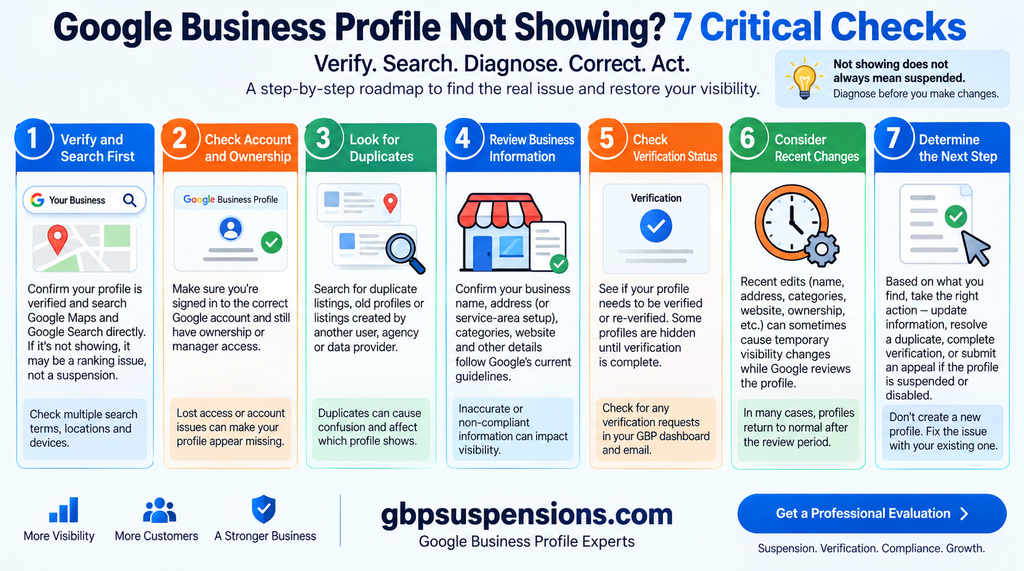
Google Business Profile not showing on Google Search or Maps? That does not automatically mean your profile is suspended.
A verified Business Profile can be difficult to find for several different reasons. The profile may be new, suspended, affected by a duplicate, configured incorrectly, recently reinstated, or simply not ranking for the search you are using.
Before creating another profile or changing everything, diagnose what is actually happening.
1. Search Your Exact Business Name + City First
Start with the simplest test.
Search Google and Google Maps for:
[Your exact business name] + [city]
For example:
Smith Plumbing Philadelphia
If your Business Profile appears when you search the exact business name and city but does not appear when you search “plumber near me,” the profile may not be missing at all.
It may simply not rank highly enough for that broader search.
That distinction matters because a ranking problem is very different from a suspension, verification problem, or missing profile.
Google Business Profile Not Showing for Keywords?
A profile can be:
Live and visible by business name
while also being:
Difficult to find for service or category searches.
Do not start changing your Business Profile or submitting suspension appeals simply because you are not ranking for a keyword.
If your profile is live but not ranking well, that becomes a local SEO problem rather than a reinstatement problem.
2. Check Whether the Profile Is Actually Verified
If your Google Business Profile is not showing, confirm the verification status first.
Google may require businesses to verify or re-verify their profiles before they can be managed normally.
Verification does not guarantee high rankings.
Those are two separate issues:
Verification = Google has completed the required verification process.
Ranking = Where Google chooses to display the business for a particular search.
If Google is asking you to complete video verification, review our complete guide:
Google Business Profile Video Verification: Requirements, Examples & How to Pass
If your verification keeps failing, do not repeatedly submit the same video without determining what Google may be unable to confirm.
3. Check for a Suspension or Disabled Profile
If your profile has disappeared completely, determine whether Google has suspended or disabled it.
Google can restrict Business Profiles that do not meet its guidelines.
If you received a suspension notice, do not immediately start changing every field on the profile.
And do not create a replacement listing simply because the original profile disappeared.
First determine what happened to the original profile.
Our GBP Reinstatement Guide explains what to review before submitting an appeal.
If the first appeal has already been rejected, read:
Google Business Profile Appeal Denied: What to Do Next
The goal is to correct the actual issue rather than guessing.
4. Look for a Duplicate Business Profile
Another reason a Google Business Profile may not be showing correctly is a duplicate.
Duplicates can appear because:
- A previous owner created another profile.
- An employee created a second listing.
- An agency created a replacement profile.
- The business moved and someone created a new listing.
- Multiple profiles were created for one service-area business.
Do not automatically delete a profile when you discover a duplicate.
First determine:
Which profile legitimately represents the business?
Does the older profile contain reviews or history?
Is the second profile actually a duplicate, or does it represent a different eligible business?
Creating another profile before answering those questions can make the situation more complicated.
For more suspension causes and compliance issues, see:
Google Business Profile Suspensions: Causes and Fixes
5. Check Your Address and Service-Area Setup
Address problems deserve careful review when a Business Profile disappears.
Google has specific requirements for physical locations, virtual offices, coworking locations, storefronts, and service-area businesses.
Service-Area Businesses
If your business travels to customers and does not serve customers at its location, the profile may need to be configured as a service-area business.
Examples can include:
- Plumbers
- Electricians
- HVAC companies
- Cleaning services
- Landscapers
- Mobile service businesses
A legitimate home-based service-area business does not automatically need to publicly display the owner’s residential address.
Storefront Businesses
A storefront should genuinely serve customers at the location during its stated business hours.
Google also expects businesses displaying a customer-facing address to meet its location requirements.
Virtual offices and addresses used only to create a presence in another city can create eligibility problems.
Coworking spaces are not automatically prohibited, but the business still needs to meet Google’s requirements for operating at that location.
If you are unsure whether your business should be configured as a storefront, service-area business, or hybrid business, review:
Google Business Profile Suspension Help
6. Check Whether the Profile Was Recently Reinstated
If Google recently approved your reinstatement, do not automatically assume something is wrong because the profile is not immediately appearing everywhere.
A reinstated profile may need some time before visibility stabilizes.
This is also where many business owners make a costly mistake.
They get reinstated, do not immediately see the profile ranking normally, and start changing:
- Categories
- Address
- Business name
- Service areas
- Website
- Phone number
That makes it harder to determine whether the profile simply needed time or whether another issue exists.
First determine whether:
The profile is not live
or
The profile is live but has not regained normal visibility.
Those are different problems.
If you recently came through a suspension, review:
How to Appeal a Google Business Profile Suspension
7. Determine Whether This Is Actually a Ranking Problem
This may be the most important check.
If your Business Profile appears when searching your exact business name + city, the listing may be functioning normally.
The issue could simply be rankings.
For example:
You search:
Smith Plumbing Philadelphia
and the profile appears.
But when you search:
plumber near me
you cannot find it.
That does not prove your profile disappeared.
It means you need to separate GBP troubleshooting from local SEO visibility.
Creating another Business Profile is not the solution to poor rankings.
Real Businesses Are Experiencing This Exact Problem
This is not an unusual question.
In one 2026 Reddit thread, a business owner said their Business Profile had been active for years and then suddenly disappeared from both the dashboard and Google Search without a suspension notice.
They had already tried Google support and the GBP community and still could not determine what happened.
That is a good example of why “my Google Business Profile is not showing” should not immediately be diagnosed as one specific problem.
The symptom can have multiple causes.
Why Is My Google Business Profile Verified but Not Showing?
A verified profile that does not appear where you expect could involve several different situations:
- The profile was recently verified.
- You are searching a competitive keyword rather than the exact business name.
- The profile has been suspended or disabled.
- A duplicate profile exists.
- The address or service-area configuration needs review.
- The profile was recently reinstated.
- The profile is live but does not rank highly for that search.
The symptom may look identical:
“I can’t find my business.”
But the solution depends on which situation applies.
Should I Create a New Google Business Profile?
Usually, no.
Do not create another profile simply because the existing profile stopped appearing.
First determine whether the original profile:
- Still exists
- Is verified
- Is suspended
- Needs re-verification
- Has a duplicate
- Was recently reinstated
- Is simply not ranking
A second profile can introduce duplicate-listing problems and make diagnosis harder.
Is My Google Business Profile Suspended or Just Not Ranking?
Use this simple test:
Search your exact business name + city.
If the profile appears:
The profile is likely live.
Investigate rankings and visibility rather than automatically assuming suspension.
If the profile does not appear:
Check:
- Verification
- Suspension notices
- Account restrictions
- Duplicate profiles
- Eligibility
- Business address
- Service-area configuration
- Recent reinstatement
That gives you a much better starting point.
What If Google Business Profile Video Verification Failed?
Video verification is another separate issue.
A rejected verification video does not automatically prove that your business has been suspended.
Google may simply need additional evidence that:
- The business operates where claimed.
- The person recording manages the business.
- The location or service-area setup is legitimate.
- The business has the tools, equipment, signage, or other evidence expected for that type of business.
Repeatedly submitting the same video without diagnosing the problem usually is not the best approach.
Read our complete GBP Reinstatement Services information if verification and suspension issues are overlapping.
Frequently Asked Questions
Why is my Google Business Profile not showing on Google Maps?
Possible causes include verification, suspension, a duplicate listing, address or service-area configuration, recent reinstatement, or poor rankings.
Start by searching your exact business name and city.
Why is my Google Business Profile verified but not showing?
Verification does not guarantee prominent rankings.
If the profile appears for your exact business name but not for broad searches such as “plumber near me,” the problem may be local ranking rather than verification.
Can a Google Business Profile disappear without being suspended?
Yes.
A profile that seems missing can involve verification, visibility, duplicate, account, eligibility, or ranking issues.
That is why the profile should be diagnosed before assuming suspension.
Should I create another GBP if mine disappeared?
Not until you determine what happened to the existing profile.
Creating another profile can create a duplicate and make the situation harder to resolve.
Why can I find my business by name but not “near me”?
That usually points more toward visibility and ranking than a missing Business Profile.
If your exact business name brings up the listing, the profile itself may be live.
Don’t Guess Why Your Google Business Profile Isn’t Showing
A missing Business Profile, suspended profile, verification problem, duplicate listing, and poorly ranking profile can look like the same problem to a business owner.
They are not.
Before creating another profile, changing your address, or submitting an appeal:
Verify → Search → Diagnose → Correct → Act
If your Google Business Profile is not showing and you suspect a suspension, verification, duplicate, or compliance problem, GBP Suspensions can review the profile and determine the strongest compliant next step.
Start with a GBP suspension evaluation